- Zero-Code Efficient Printing: Multi-Dimensional Table-Based Label Automation Solution
- PrintSpirit Table Operation Tips (Part 1)
- PrintSpirit Table Operation Tips (Part 2): Report Printing
- Integrating LabVIEW with PrintSpirit for Barcode Printing | Technical Solution
- Barcode Label Printing Solution for Production Enterprises in Intranet Environment
- Embed "PrintSpirit" into Third-Party Websites for Quick Label Printing
- How to Quickly Implement Label Printing Functionality in Information Systems
- "Print Genie: JavaScript Scripts Help You Design Complex and Flexible Labels"
- "PrintSpirit" Print Service Fails to Start Automatically Solution
- Developing Label Printing Function for Information Systems at Minimal Cost with PrintSpirit Custom Edition
- Several Methods to Implement WEB Printing
- Introduction to Portable Mobile Printing Protocol CPCL
- In-depth Understanding of Zebra Printers and ZPL Language: A Beginner's Guide
Zero-Code Automated Label Printing Solution with Multi-Dimensional Tables
(Compatible with WPS, DingTalk, Feishu, etc.)
Cloud printing integrated with automation workflow multiplies office efficiency
Still Manually Printing Barcode Labels? Embrace Automation!
With the popularity of zero-code multi-dimensional table tools like WPS Multi-Dimensional Tables, DingTalk Smart Sheets, and Feishu Multi-Dimensional Tables, their powerful automation capabilities are reshaping workflows. However, a critical pain point persists: the lack of professional barcode and label printing functionality!
Common Scenarios:
- Warehouse Logistics: Need instant generation of standard-compliant barcode labels for fast material handling?
- Medical Laboratories: Require high-definition medical labels that meet strict compliance standards?
- Manufacturing: Urgent need for automated product/asset labeling?
When professional, compliant label printing becomes essential, can you tolerate tedious manual data transfer between tables and label software?
PrintSpirit: The Professional Barcode Label Printing Solution You Need!
Its powerful cloud printing API is natively designed for seamless integration with WPS/DingTalk/Feishu multi-dimensional tables and other zero-code platforms.
Now, combining multi-dimensional tables' automation engine with PrintSpirit's printing capabilities, you will:
- Eliminate manual printing errors and inefficiencies
- Build zero-code automated label workflows with sub-second response from data input to label output
- Effortlessly handle specialized barcodes (GS-128, Datamatrix, PDF417, etc.) for medical, automotive parts and other demanding industries
This guide demonstrates integration with WPS Multi-Dimensional Tables and PrintSpirit, covering:
- How to build zero-code label systems
- Key steps for seamless data-to-label workflows
- Adaptations for DingTalk/Feishu users
Unlock efficient, precise label printing today!
1. Multi-Dimensional Tables: Next-Gen Zero-Code Data Management
Modernizing spreadsheets with database-like relational capabilities and visual interfaces, multi-dimensional tables empower non-technical users to build complex data systems.
Key Advantages:
- Multi-View Display: Switch between kanban, calendar, form views
- Automation Engine: Preconfigure triggers (e.g., new records) to auto-execute actions
- Relational Data Links: Cross-table associations avoid redundancy
- Granular Permissions: Detailed access controls
These tables excel as central data hubs but lack professional printing capabilities. Enter PrintSpirit.
2. PrintSpirit: Professional Label Design & Printing
PrintSpirit (www.printspirit.cn) offers intuitive drag-and-drop label design with true WYSIWYG editing. It supports all major barcode standards and printer types across platforms.
Key features for integration:
- Cloud Printing Service: Obtain a dedicated WEBHOOK API after registration
- IoT Architecture: Solve intranet penetration challenges for reliable remote printing
- Enterprise Integration: Seamless ERP/WMS connectivity
Integrate multi-dimensional tables' data handling with PrintSpirit's printing expertise for code-free label solutions. Our asset management case demonstrates this synergy.
3. Implementation Guide: Automated Asset Label System
1. Preparations
- Install PrintSpirit (Web/Central/Desktop versions all supported)
- Register account (Free, required for cloud printing)
- Design a label template and note its ID
Example asset label: ID=b2f1c6de-c9fc-4766-b638-c1b39ff076a5
- Activate WPS 360 (Free multi-dimensional tables)
2. Activate Cloud Printing
Access PrintSpirit's settings at http://127.0.0.1:9011 (Desktop/Central edition) and activate cloud printing. Log in to obtain your unique cloud printing ID. This ID displays only once - save it securely!
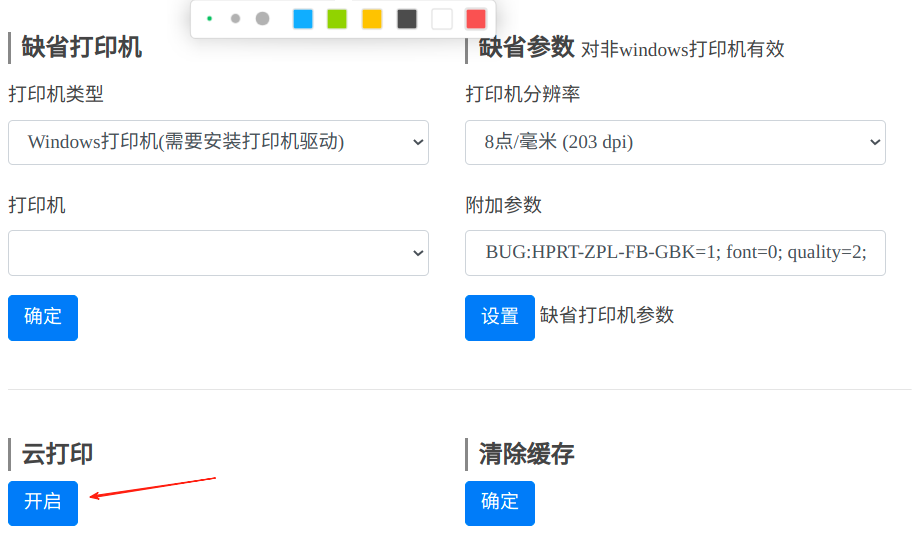
Test with cURL:
1curl -X POST -H "Content-Type: application/json" -d '{"var1":"value1"}'\
2 'https://www.printspirit.cn/cloud/print/PrWXmkWZ4VZ4tDQx3yVWcH?tpid=140630e1-0eb4-4910-8c5a-c7118bcec343&printer=Spirit+Image'
URL Format:
https://www.printspirit.cn/cloud/print/{Cloud_ID}?tpid={Template_ID}&printer={Printer_Name}
- Use URL encoding for printer names containing spaces
- Clear cache via PrintSpirit console after parameter changes
- Reference Printer Parameters
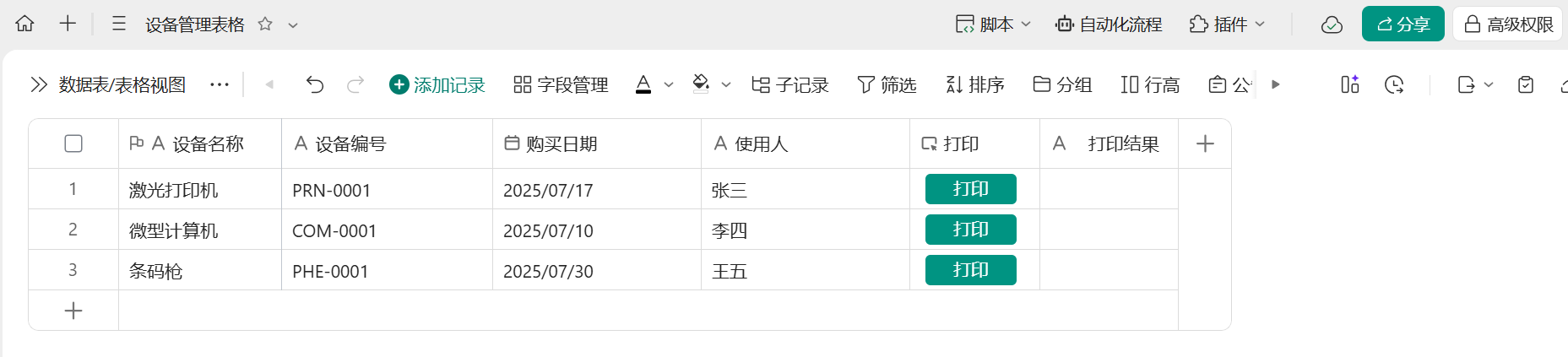
3. Create Asset Management Table
Build a WPS multi-dimensional table with fields matching label variables: Device Name, Device ID, User, Purchase Date. Add print trigger button and status fields:
4. Configure Automation Workflow
Implement button-triggered automation with error handling:
- Trigger: Button click
- Condition: Check "Print Status" is empty
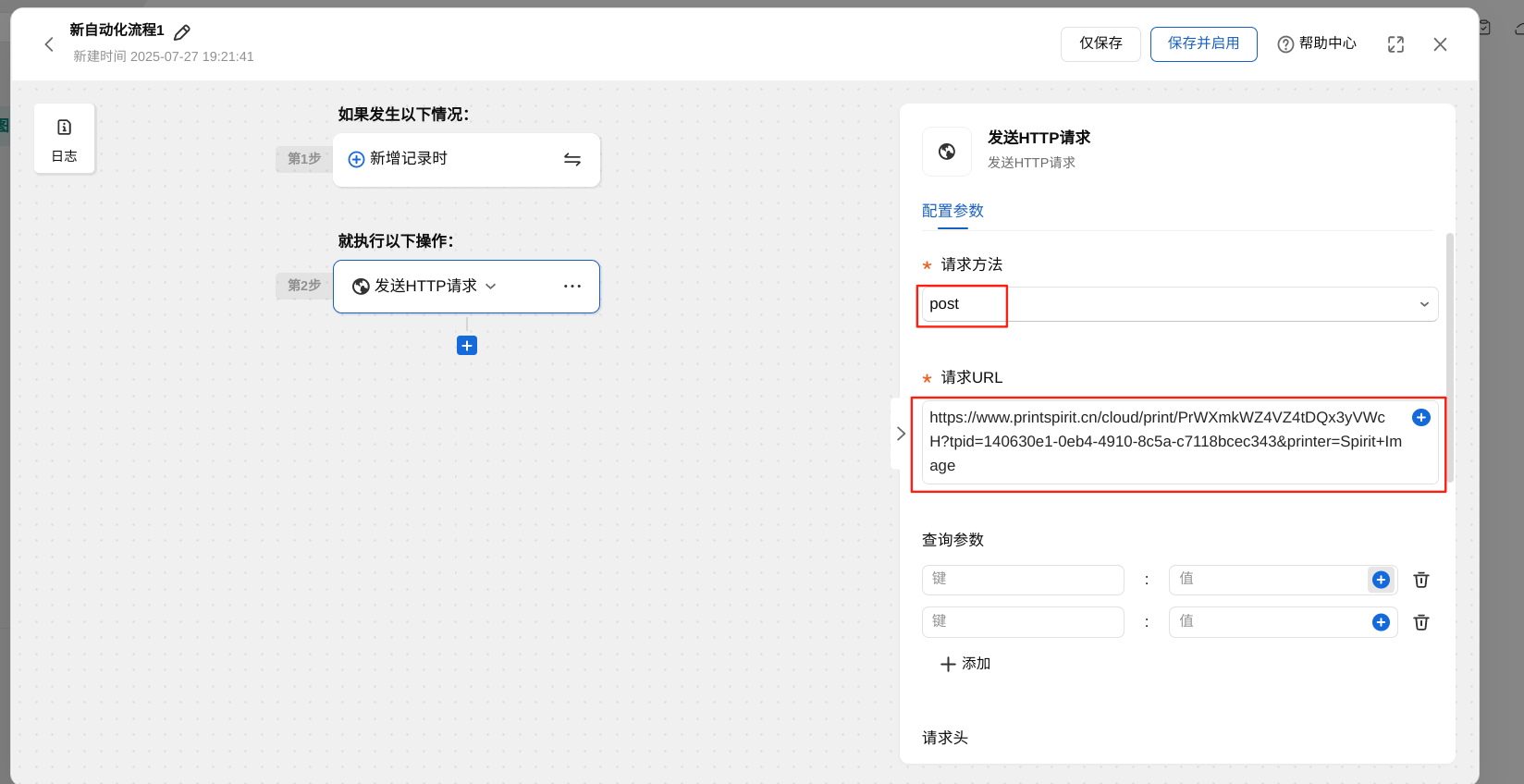
- HTTP Request:
- Method: POST
- URL: Your cloud print URL
- Body:
{"device":"{DeviceName}","id":"{DeviceID}","user":"{UserName}","date":"{PurchaseDate}"}
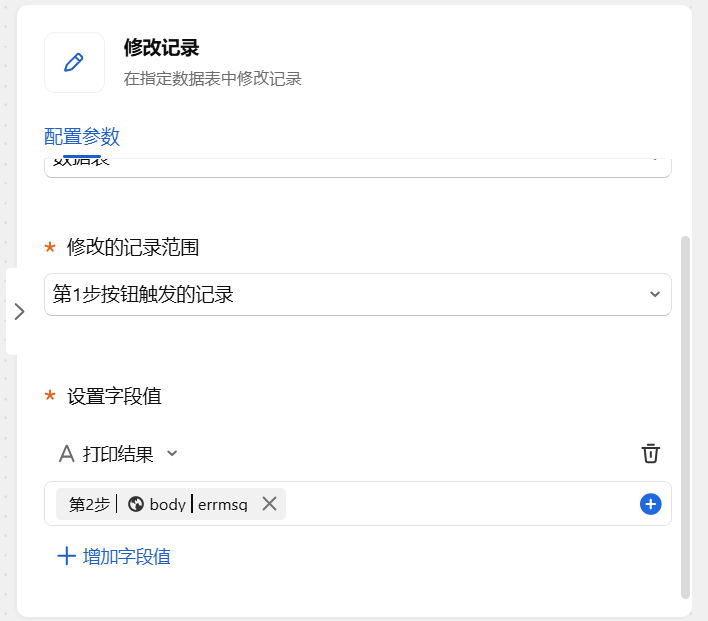
- Status Update (Optional): Write
{{response.rc}} - {{response.errmsg}}to status field
4. Scenario Extensions
| Scenario | Implementation | Platforms |
|---|---|---|
| Approval-Triggered Printing | Post-approval automation | All |
| Mobile QR Code Printing | Scan-to-print workflows | WeChat/DingTalk |
| Mixed Template Printing | Conditional template selection | Universal |
Conclusion: Redefining Digital Office Workflows
The WPS/DingTalk/Feishu & PrintSpirit integration creates enterprise-grade label solutions without coding. It bridges the critical "data-to-physical" gap through:
- Democratized Automation: Office staff can build IT-grade systems
- Future-Proof Architecture: Scalable for evolving automation needs
- Industrial Compliance: Meets medical/logistics printing standards
Production Tips:
- Implement HTTP retry mechanisms in automation rules
- Use PrintSpirit's virtual printer for validation before physical printing
- Monitor print queues via PrintSpirit dashboard
Start your 30-day free trial at printspirit.cn/download and transform your label workflows today!
Leave Your Message
- Still Manually Printing Barcode Labels? Embrace Automation!
- 1. Multi-Dimensional Tables: Next-Gen Zero-Code Data Management
- 2. PrintSpirit: Professional Label Design & Printing
- 3. Implementation Guide: Automated Asset Label System
- 4. Scenario Extensions
- Conclusion: Redefining Digital Office Workflows